


Control your participation in Flex EV events
Please review the processes listed below for steps on how to override individual Flex events to restart charging, depending on your method of enrollment and equipment.
If using the Optiwatt app
The Optiwatt app is the recommended way to manage your participation in Flex events.
It provides advanced Flex event notifications, charge scheduling, the ability to decline participation in an upcoming Flex event and the option to start vehicle charging after a Flex event has already started.
-
Optiwatt charge forecast
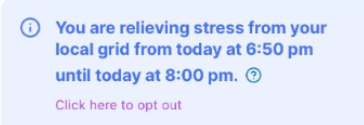
Upcoming Flex Events will appear in the ‘Charge Forecast’ section of the home screen 24 hours prior to the start time.
The notification will indicate the event start and end times and give you the option to opt out in advance.
-
Optiwatt charging during an event
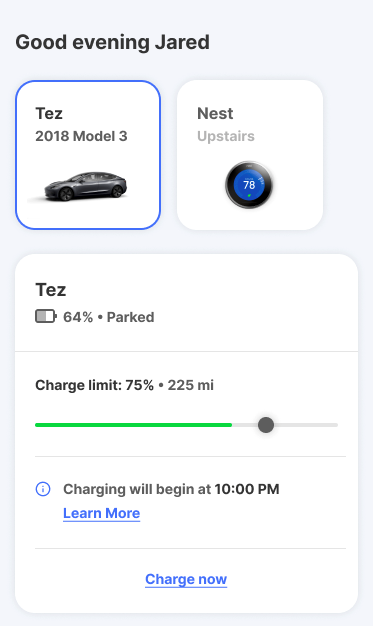
Upcoming Flex Events will appear in the ‘Charge Forecast’ section of the home screen 24 hours prior to the start time.
The notification will indicate the event start and end times and give you the option to opt out in advance.

If using your networked EV charger
-
ChargePoint
To choose not to participate in a Flex event, toggle the ‘Participate in Event’ slider in the ‘Utility Event’ section of your ‘Chargepoint’ app.
Or, press the ‘Start Charging’ button on the home page of the app.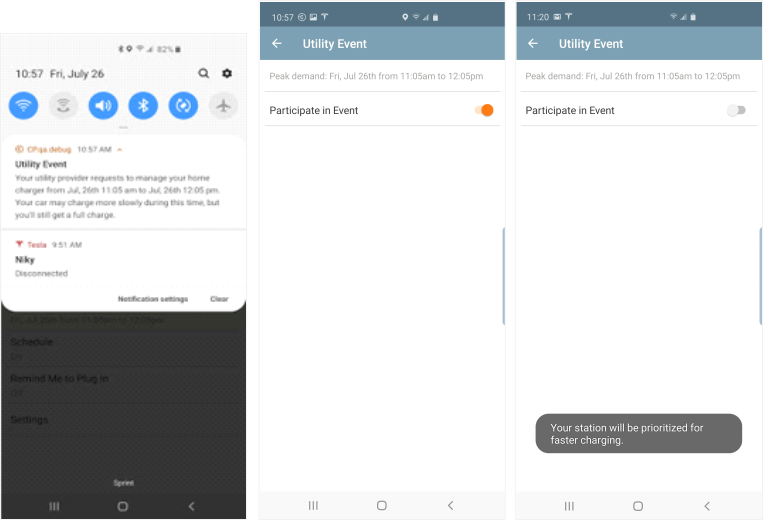
-
Wallbox
Wallbox does not currently have an app-based feature to allow you to choose to participate in a Flex Event.
If you are unable to charge your EV to your needed level when a Flex event starts, you can choose not to participate by manually disconnecting the charger plug from your EV for 30 seconds and then plugging it back in. This will allow you to resume charging. -
Emporia
Participants can see the event in progress in the Emporia app. Emporia currently does not have push notifications at this time.
How to Opt out of an Emporia event:
To opt out of this event, after the event begins, you can use the Emporia EV charger app, ‘Emporia Energy’, to change the charger charging status from paused to charging. Your charger will now charge the vehicle, thus opting you out of the Flex event.
If using your onboard vehicle telematics
You can also opt out of a Flex event by using the manufacturer app for your EV, instead of Optiwatt, if desired. Each platform may vary.
If you enrolled directly via your BMW or Ford app, you will need to opt out in these platforms.
-
BMW
To opt out of a Flex event you will need to use the ‘My BMW’ app.
- Open ‘ChargeForward’ within the My BMW App
- Select ‘Skip Smart Charging’ on the Dashboard. The current Charge Plan will be overridden, and your vehicle will start charging immediately.
- Note that charging optimizations will be suspended for 24 hours. They will resume in the first charging session after the 24 hour period.
-
Ford
You may receive a text message from Ford in advance of a Flex event. If so, you can choose to opt out of the upcoming event by replying with the word IGNORE.
If you do not receive text messages from Ford, you can also opt out using your FordPass app.
- Navigate to the Vehicle section of the FordPass app
- Press the ‘Start’ button to start charging, opting out of the active Flex event